
[](https://www.gamsgo.com/)

Subscription

 SVOD
SVOD
 AI
AI
 Marketplace
 Software
SVOD
Explore SVOD
- YouTube Hot
- Netflix
- Crunchyrol New
- The New York Times
- DZN SPORTS Hot
- Viki
- FOX One
- OSN+
- TOD TV
AI
Explore AI
- ChatGPT Hot
- Gemini Hot
- Suno
- Midjourney New
- Perplexity AI
- Grok Hot
- Claude
- Kling AI
- Runway
- Higgsfield
- Poe
- Genspark
- Dreamina
- Cursor
- Candy AI
- Nano Banana (Web)
- Lumina
- GitHub Copilot New
- Windows Copilot New
- Leonardo AI
- Hailuo AI
- luma
- InVideo AI
Marketplace
Explore Marketplace
- Apple New
- Netflix
- Claude Hot
- SuperGrok Hot
- AI API New
- Midjourney New
- Cursor Hot
- Elevenlabs
- Runway New
- Microsoft Office
- Prime Video
- TradingView
- Zoom
- ExpressVPN
- Proton VPN
- Coursera
- Discord
- Telegram
- Higgsfield
- Lovable
- Manus
- HeyGen
- Figma New
- DZN SPORTS Hot
- Crunchyroll
- Mubi
- Shahid
- Viki
- The Wall Street Journal
- QuillBot
- Snapchat
- Google Antigravity
- Bloomberg
Software
Explore Software
- Cannva
- Adobe Hot
- CapCut Hot
- Filmora
- N-VPN Hot
- ExpressVPN
- WPS
- Windows 11
- Windows 10
Game

 Top Ups
 Accounts
 Items
Items
 Gift Cards
 Coins
Coins
Top Ups
Explore Top Ups
- Free Fire Hot
- PUBG MOBILE
- Roblox Hot
- Mobile Legends
- Genshin Impact Hot
- Fortnite
- Valorant Hot
- Honkai: Star Rail Hot
- Zenless Zone Zero
- Call of Duty: Mobile
- Brawl Stars
- Clash of Clans
- Pokémon GO Hot
- Whiteout Survival
- Last War: Survival
- Wuthering Waves New
- Delta Force
- Marvel Rivals
- Clash Royale
- Blood Strike Hot
- Arena Breakout
- Arknights: Endfield
- Identity V
- Rise of Kingdoms
- Kingshot
- NTE: Neverness to Everness New
- LastZ: Survival Shooter New
- The Seven Deadly Sins Origin
- Gemini Recharge New
- ChatGPT Recharge Hot
- Tinder Recharge New
Accounts
Explore Accounts
- Roblox Hot
- Fortnite New
- Minecraft
- Valorant Hot
- GTA 5
- League of Legends
- Genshin Impact Hot
- Free Fire Hot
- PUBG MOBILE
- Wuthering Waves New
- Honkai: Star Rail Hot
- Zenless Zone Zero
- EA SPORTS FC
- Steam
- Call of Duty
- Call of Duty: Mobile
- Apex Legends
- Clash of Clans
- GODDESS OF VICTORY: NIKKE
- ONE PIECE Bounty Rush
- Forza Horizon 6
- Pokémon GO
- Arc Raiders
Items
Explore Items
- Roblox Hot
- Fortnite New
- Monopoly GO
- Call of Duty
- Minecraft Hot
- Arc Raiders
Gift Cards
Explore Gift Cards
- Apple Hot
- PlayStation
- Xbox New
- Nintendo
- Roblox
- Free Fire Hot
- Valorant Hot
- PUBG G-Coin
- PUBG MOBILE
Coins
Explore Coins
- Roblox Hot
- EA SPORTS FC New
- Path of Exile 2
- Diablo IV
- ELDEN RING
- Albion Online
Support
24/7 Live SupportMy OrderBlogAffiliateSell To UsContact UsRefund Policy
Search in GamsGo
EN | USD
Log In/Sign Up
- Subscription
SVOD * YouTube * Netflix * Crunchyrol * The New York Times * DZN SPORTS * Viki * FOX One * OSN+ * TOD TV
AI * ChatGPT * Gemini * Suno * Midjourney * Perplexity AI * Grok * Claude * Kling AI * Runway * Higgsfield * Poe * Genspark * Dreamina * Cursor * Candy AI * Nano Banana (Web) * Lumina * GitHub Copilot * Windows Copilot * Leonardo AI * Hailuo AI * luma * InVideo AI
Marketplace * Apple * Netflix * Claude * SuperGrok * AI API * Midjourney * Cursor * Elevenlabs * Runway * Microsoft Office * Prime Video * LinkedIn * TradingView * Zoom * ExpressVPN * Proton VPN * Coursera * Discord * Telegram * Higgsfield * Lovable * Manus * HeyGen * Figma * DZN SPORTS * Crunchyroll * Mubi * Shahid * Viki * The Wall Street Journal * QuillBot * Snapchat * Google Antigravity * Bloomberg
Software * Cannva * Adobe * CapCut * Filmora * N-VPN * ExpressVPN * WPS * Windows 11 * Windows 10
- Game
Top Ups * Free Fire * PUBG MOBILE * Roblox * Mobile Legends * Genshin Impact * Fortnite * Valorant * Honkai: Star Rail * Zenless Zone Zero * Call of Duty: Mobile * Brawl Stars * Clash of Clans * Pokémon GO * Whiteout Survival * Last War: Survival * Wuthering Waves * Delta Force * Marvel Rivals * Clash Royale * Blood Strike * Arena Breakout * Arknights: Endfield * Identity V * Rise of Kingdoms * Kingshot * NTE: Neverness to Everness * LastZ: Survival Shooter * The Seven Deadly Sins Origin * Gemini Recharge * ChatGPT Recharge * Tinder Recharge
Accounts * Roblox * Fortnite * Minecraft * Valorant * GTA 5 * League of Legends * Genshin Impact * Free Fire * PUBG MOBILE * Wuthering Waves * Honkai: Star Rail * Zenless Zone Zero * EA SPORTS FC * Steam * Call of Duty * Call of Duty: Mobile * Apex Legends * Clash of Clans * GODDESS OF VICTORY: NIKKE * ONE PIECE Bounty Rush * Forza Horizon 6 * Pokémon GO * Arc Raiders
Items * Roblox * Fortnite * Monopoly GO * Call of Duty * Minecraft * Arc Raiders
Gift Cards * Apple * PlayStation * Xbox * Nintendo * Roblox * Free Fire * Valorant * PUBG G-Coin * PUBG MOBILE
Coins * Roblox * EA SPORTS FC * Path of Exile 2 * Diablo IV * ELDEN RING * Albion Online
Support
- My Order
- Blog
- Affiliate
- Sell To Us
- Contact Us
- Refund Policy
GamsGoBlogSoftwareHow to Clear Cache and Cookies for One Website
List of Contents
Why Should You Clear Cache and Cookies for One Website?
How to Clear Cache and Cookies in Chrome
* [Chrome on Windows and macOS](https://www.gamsgo.com/blog/clear-cookies-and-cache#Chrome%20on%20Windows%20and%20macOS)- Chrome on Android
- Chrome on iPhone
How to Clear Cache and Cookies in Microsoft Edge
* [Edge on Windows and macOS](https://www.gamsgo.com/blog/clear-cookies-and-cache#Edge%20on%20Windows%20and%20macOS)How to Clear Cache and Cookies in Safari
* [Safari on Mac](https://www.gamsgo.com/blog/clear-cookies-and-cache#Safari%20on%20Mac)- Safari on iPhone
What Should You Do After Clearing Website Data?
Conclusion
Frequently Asked Questions
* [Will clearing cookies log me out?](https://www.gamsgo.com/blog/clear-cookies-and-cache#Will%20clearing%20cookies%20log%20me%20out%3F)- Will clearing cache delete my saved passwords?
- Can I clear data for only one website?

By GamsGo Team
2026/07/20
Share


A website may suddenly stop loading, display outdated content, or reject the correct login details. In many cases, the problem is caused by expired cookies or cached files stored in your browser.
You do not always need to clear all browsing data. Removing cache and cookies for one website can fix common errors without signing you out of every other account or deleting data from unrelated websites.
This guide explains how to clear cache and cookies for a single website in Chrome, Microsoft Edge, and Safari. Follow the steps below to troubleshoot the issue, or contact GamsGo customer support if the problem affects a subscription or account purchased through GamsGo.

Why Should You Clear Cache and Cookies for One Website?
Browsers save cookies and temporary files to help websites load faster. However, this stored data may become outdated or conflict with a recent website update.
Clearing the data for one website may help fix:
- Login errors
- Blank or frozen pages
- Old page content
- Incorrect account information
- Buttons that do not respond
You may need to sign in again after deleting the website’s cookies.
How to Clear Cache and Cookies in Chrome
Chrome on Windows and macOS
- Open Chrome.
- Click the three-dot menu and select Settings.
- Go to Privacy and security > Third-party cookies.
- Select See all site data and permissions.
- Search for the website name.
- Click the delete icon next to the website and confirm.
Chrome will remove the cookies and stored data for that website only.
Chrome on Android
- Open Chrome and tap the three-dot menu.
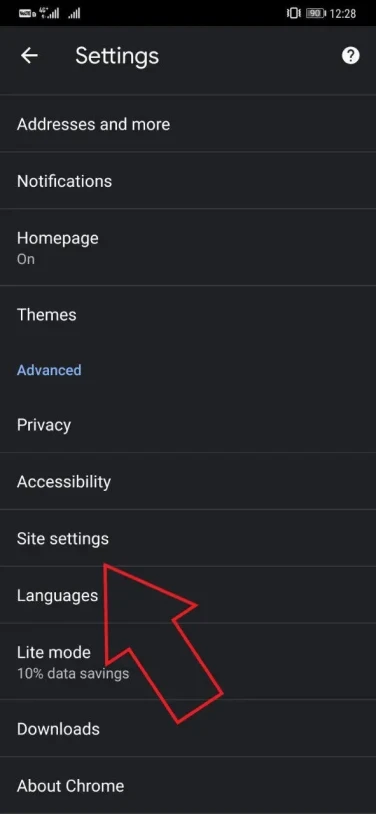
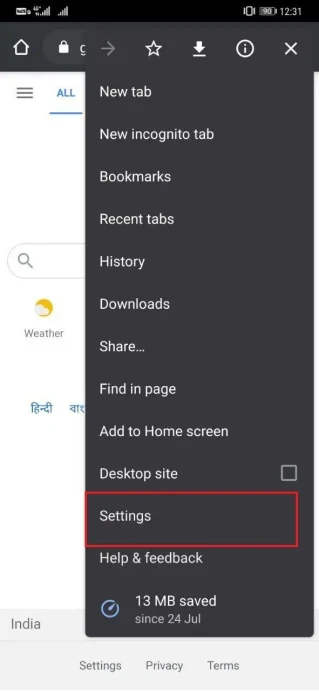 2. Select Settings > Site settings > All sites.
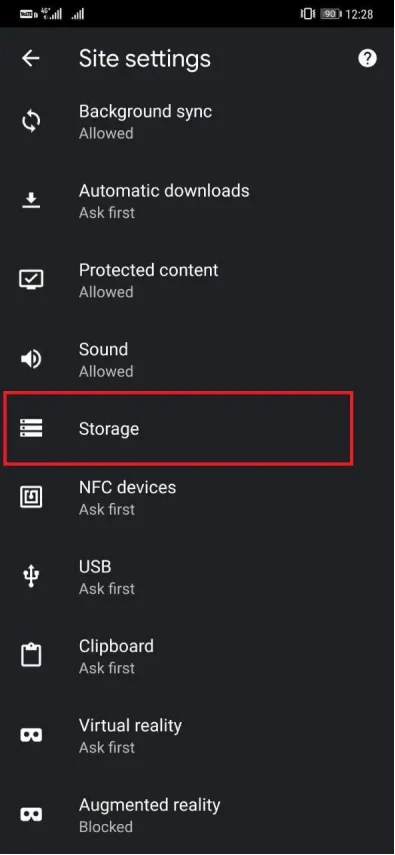 3. Find and open the website.
4. Tap Clear and reset.
3. Find and open the website.
4. Tap Clear and reset.
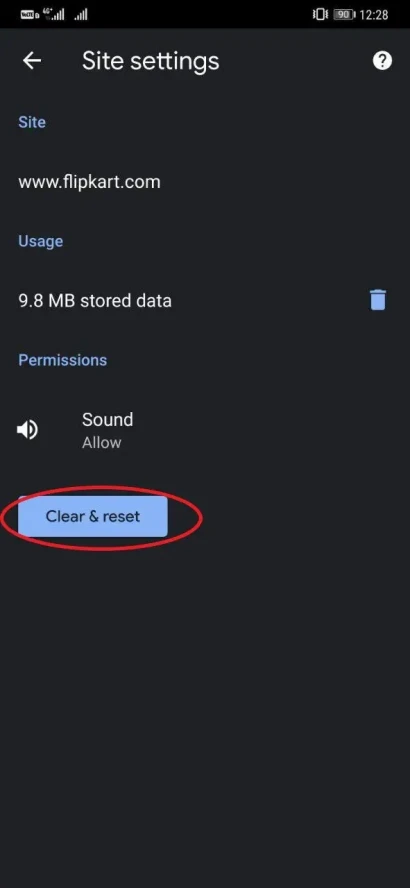 5. Confirm that you want to remove the stored data.
The menu names may look slightly different depending on your Chrome version and Android device.
Chrome on iPhone
Chrome on iPhone does not provide the same website data list as the desktop version. You need to clear browsing data for a selected time range.
- Open Chrome.
- Tap the three-dot menu.
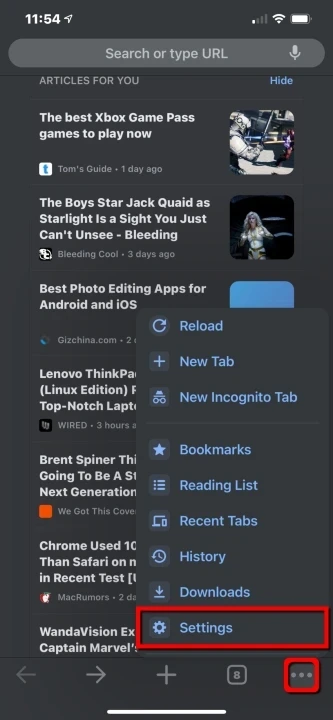 3. Select Delete Browsing Data.
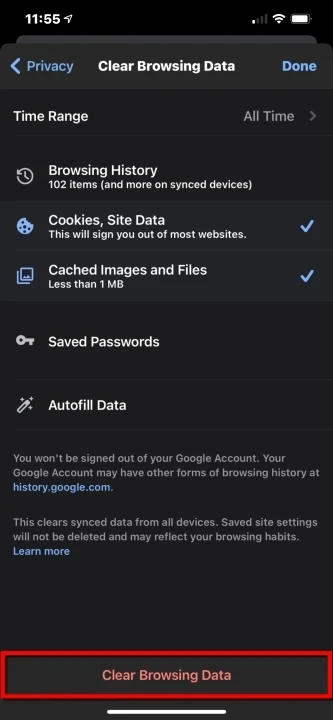 4. Choose a time range.
5. Select Cookies, Site Data and Cached Images and Files.
4. Choose a time range.
5. Select Cookies, Site Data and Cached Images and Files.
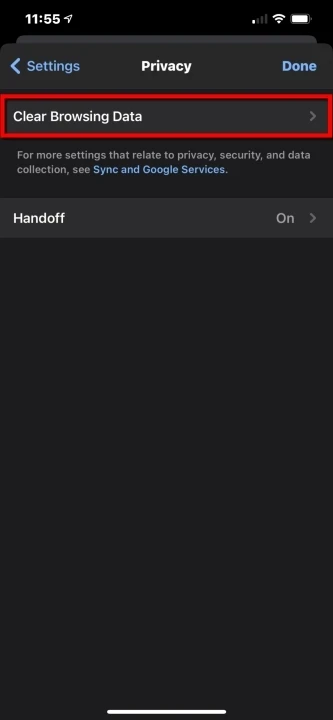 6. Tap Delete Browsing Data.
This may remove data from more than one website and sign you out of other accounts.
How to Clear Cache and Cookies in Microsoft Edge
Edge on Windows and macOS
- Open Microsoft Edge.
- Click the three-dot menu and select Settings.
- Go to Privacy, search, and services.
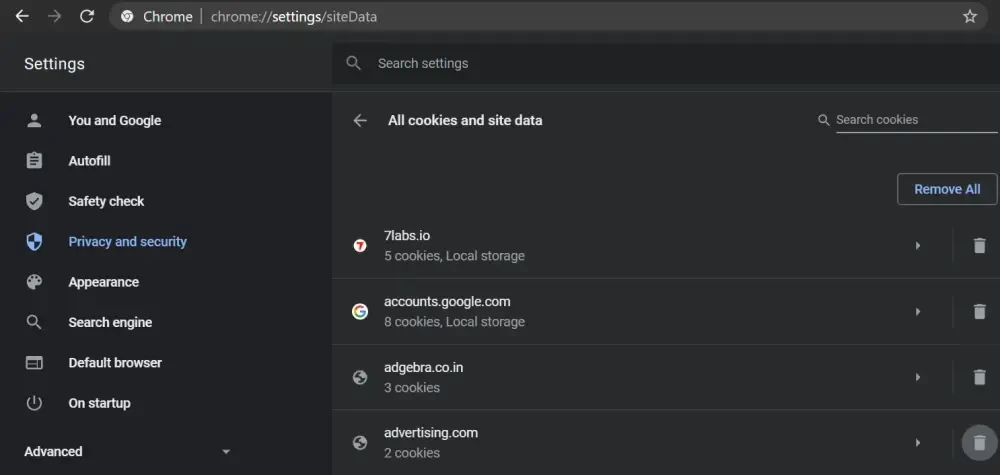 4. Select Cookies, then open See all cookies and site data.
5. Search for the website.
6. Open the website entry and click the delete icon.
4. Select Cookies, then open See all cookies and site data.
5. Search for the website.
6. Open the website entry and click the delete icon.
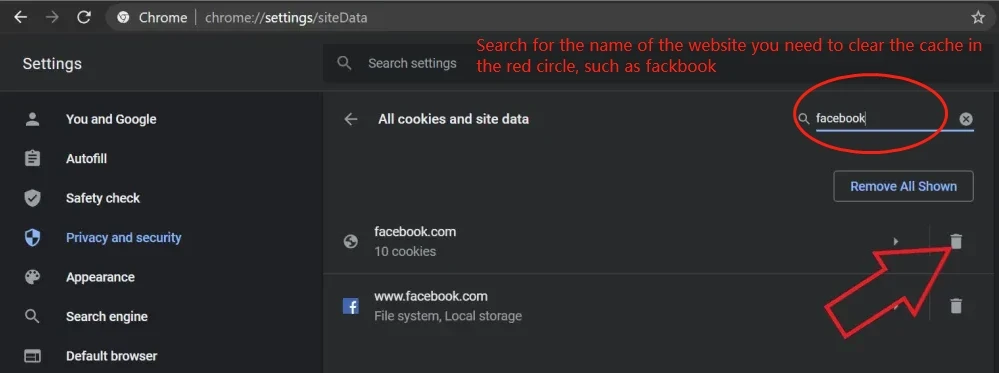
Only the cookies and stored data connected to that website will be removed.
How to Clear Cache and Cookies in Safari
Safari on Mac
- Open Safari.
- Select Safari > Settings.
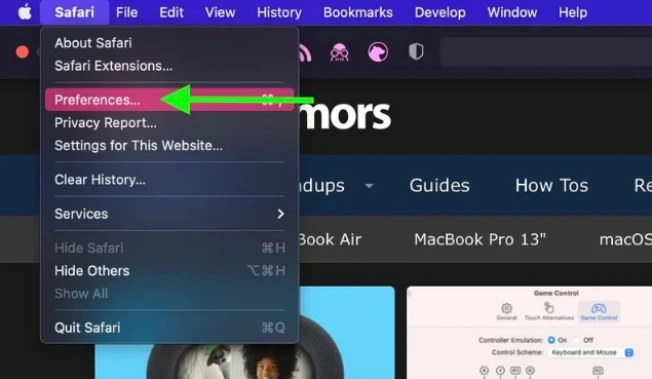 3. Open the Privacy tab.
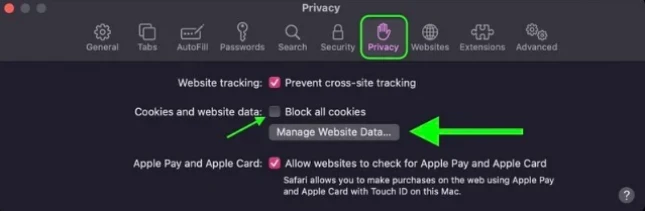 4. Click Manage Website Data.
5. Search for the website.
6. Select it and click Remove.
4. Click Manage Website Data.
5. Search for the website.
6. Select it and click Remove.
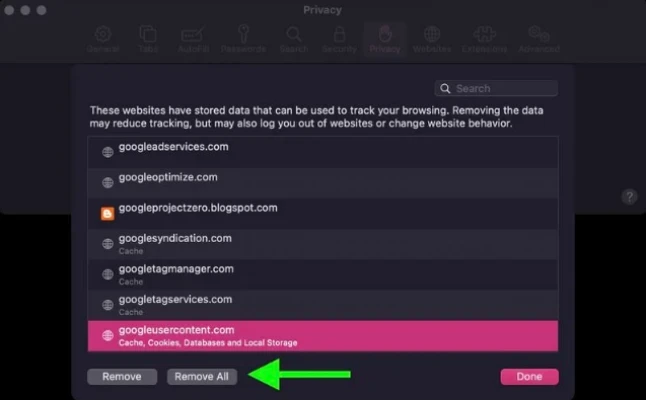
Do not click Remove All unless you want to delete data for every website.
Safari on iPhone
- Open the Settings app.
- Go to Apps > Safari.
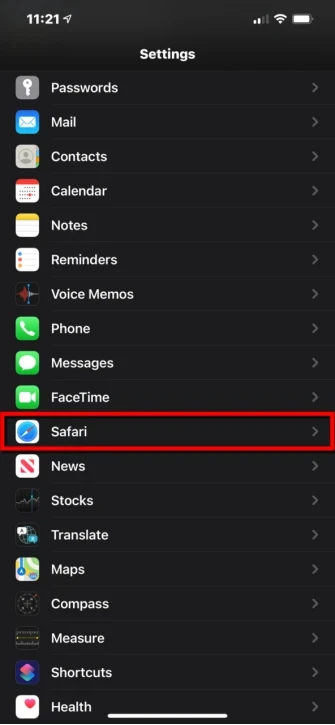 3. Tap Advanced > Website Data.
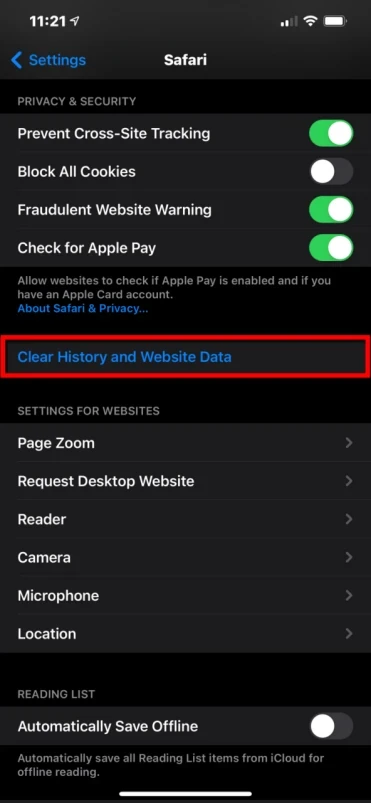 4. Find the website in the list.
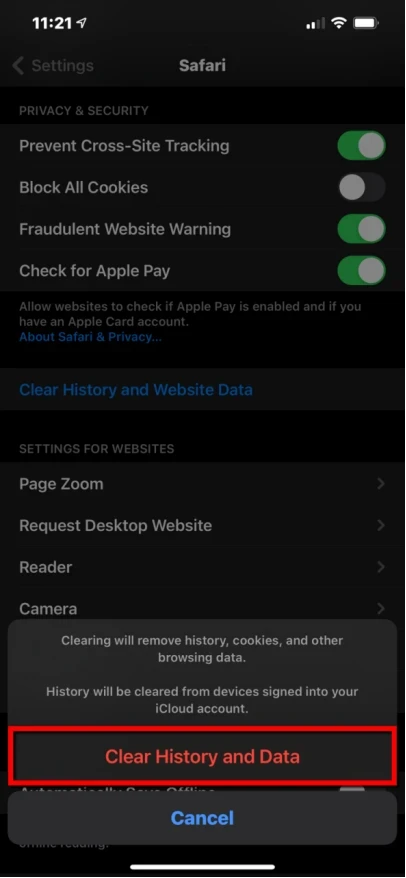 5. Remove the data connected to that domain.
You can also select Remove All Website Data, but this will clear cookies and stored data from all websites.
What Should You Do After Clearing Website Data?
Close the browser and open it again. Return to the website, reload the page, and sign in again if required.
If the problem continues, try another browser, disable browser extensions, or restart your device.
Conclusion
Clearing cache and cookies can solve many common website problems. Removing data for one website is usually the better choice because it does not affect all your other browser sessions.
After clearing the data, reopen the website and check whether it loads correctly. If you are troubleshooting Netflix or looking for a more affordable subscription, you can also check the Netflix plansavailable on GamsGo**.**
Frequently Asked Questions
Will clearing cookies log me out?
Yes. Cookies often store login sessions, so you may need to enter your username and password again.
Will clearing cache delete my saved passwords?
Normally, no. Cache files are separate from passwords saved by the browser. Make sure you do not select the password option when clearing all browsing data.
Can I clear data for only one website?
Chrome, Edge, and Safari on Mac allow you to remove data for a selected website. Chrome on iPhone may require you to delete data for a wider time range.
Articles associés
How to Share a YouTube Premium Subscription in 2026?
Unlimited Access to Deepseek: GamsGo Provides Easy and Convenient Use
Profile Naming Guidelines
By GamsGo TeamSubscription Sharing Experts
2026/07/20
Subscription Sharing Experts
GamsGo.com is a subscription sharing website that allows to connect subscription owners with co-subscribers to save money. GamsGo takes the carpooling philosophy and extends it to the world of subscriptions.
Discounted Offers

Netflix
$3.87$26.99
Limited time offer
Popular News
 How to Use Coupons & Promo Codes? Learn how to use promo codes efficiently for huge savings. Find out where to get codes and how to apply them effectively. 2026/07/20
  Profile Naming Guidelines This article explains how to change profile names across Netflix, Disney+, Deezer, Paramount+, HBO Max and more, and follow clear naming rules to use the right profile every time. 2026/07/22
  How To Whitelist an Email on Gmail, Yahoo, Outlook & More A guide about how to add email address into whitelist of all kinds of emails like Gmail, Apple mail, Outlook 2026/07/17
  How to Get Discord Nitro for Free in 2026 (8 Work Methods) Free Discord Nitro is still possible in 2026. Orbs, the new UNiDAYS student offer, Meta Quest promo, and more, each with current deadlines. Plus how to spot the fakes. 2026/07/21
  How to Get Canva Pro for Free in 2026 (9 Verified Methods + Alternatives) Looking to unlock Canva Pro without paying $15/month? See how to get Canva Pro free in 2026 through legit channels, with affordable options from $1.99/month. 2026/07/23
 TradingView Discounts Guide: Every Way to Pay Less in 2026 Find the best TradingView discounts in 2026 and access advanced charts, indicators, and alerts for less through annual deals, coupons, free trials, and more. 2026/08/03
 Filmora Student Discount 2026: Price, Eligibility and Guide Get Filmora Student Discount 2026 details, including eligibility, Student Beans verification, pricing, application steps, and alternatives. Learn how to save on Filmora Advanced with GamsGo. 2026/08/03
 How to Get Filmora Advanced for Free in 2026: 6 Safe Ways Learn how to use Filmora 15 Advanced for free or at a lower price in 2026. Compare free trials, rewards, creator programs, and GamsGo accounts. 2026/08/03
 Coursera Discount 2026: 8 Ways to Pay Less on Coursera Plus Looking for a Coursera discount? Here are 8 ways that actually work in 2026, from the official 40% off and the 7-day free trial to financial aid that covers full courses. 2026/07/31
 How to Get Zoom Pro for Free in 2026 (Legal Ways That Work) Want Zoom Pro without paying full price? See which free and low-cost routes actually work in 2026, from school licenses to nonprofit discounts and free alternatives. 2026/07/31
 Proton VPN Student Deal 2026: Save Up to 75% Does Proton VPN offer a student discount in 2026? Learn who qualifies, how to verify with Student Beans, VPN Plus and Unlimited costs, renewal rules, payment options, and cheaper alternatives through Proton Free, official deals, and GamsGo. 2026/07/31
 ExpressVPN Student Discount: How to Use a VPN for Less Discover the ExpressVPN student discount, eligibility, verification steps, pricing, included features, and cheaper alternatives like GamsGo for flexible, low-cost VPN access. 2026/07/28
 How to Get LinkedIn Premium for Free in 2026 (10 Tested Ways) Want LinkedIn Premium free in 2026? We tested every route and kept the 10 that actually work, from the official month trial to a free year for veterans and a library trick most people miss. 2026/07/24





ABOUT
- About Us
- Contact Us
- HeIp Center
- Affiliate Program
- Blog
- Brand assets
- Suggest a Subscription
- Sell to us
- Bug Bounty
- Reseller Program
LEGAL
- GamsGo T&C
- Privacy Policy
- Copyright
- Refund Policy
- AML Policy
- GDPR Data Protection Notice
LANGUAGE & CURRENCY
- English
CUSTOMER SERVICE
Support
24/7 Support, 12 hours response














+50 more
All copyrights, trade marks, service marks belong to the corresponding owners.
Copyright © 2026 GamsGo.com All Rights.
TERMS AND CONDITION and PRIVACY POLICY.