
Duolingo is a very powerful language learning tool that supports many different types of language learning. We will learn the following through this blog:
Duolingo is a very powerful language learning tool that supports many different types of language learning. We will learn the following through this blog:
- How to start a new language learning on Duolingo?
- About switching the App interface language.
- Remove existing language learning courses.
- Why should you use Duolingo? How to subscribe to Duolingo for $3.84/mon?
- Duolingo supported language list 2025.
How to switch the target language of Duolingo learning
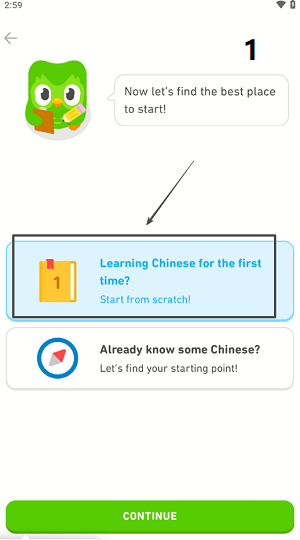
- First, when we first enter Duolingo, we need to choose a language to learn. We will take "Chinese" as an example here.
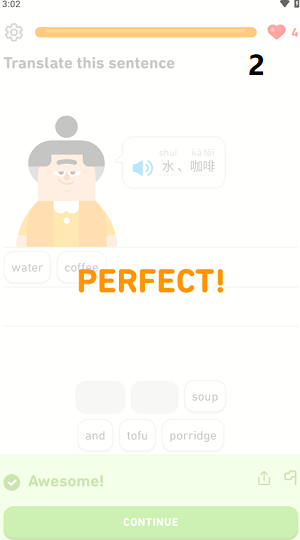
- Then we need to do a unit test. This process will not be long, with about 15 basic questions.
- After completing some basic tests, we will officially enter the language learning plan.
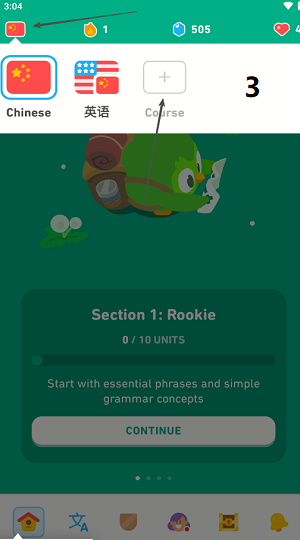
- At this time, select the language course button in the upper left corner, where you can switch to other languages for learning.
How to switch the language of the Duolingo App
- The interface language of the Duolingo App is automatically identified based on the system language of the user's mobile phone.
- We need to change the operating system language of the user's mobile phone.
- Then restart the program, and it will automatically switch to the language interface you want.
Android system language switching method
[steps]: Settings->System->Language & input->Languages
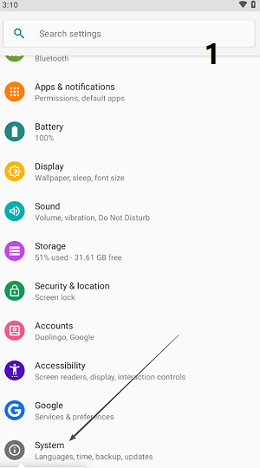
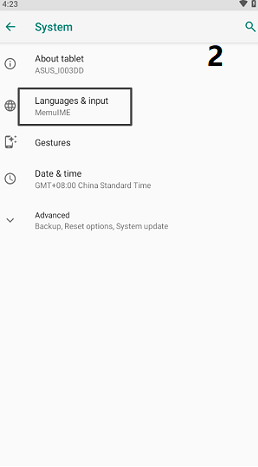
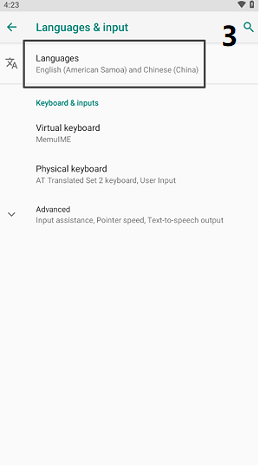
- Enter the settings menu through the phone settings.
- In the system settings, find the language & input options.
- You can modify the system language here.
- restart Duolingo to reload.
IOS system language switching method
[steps]: Settings->General->Language & Region

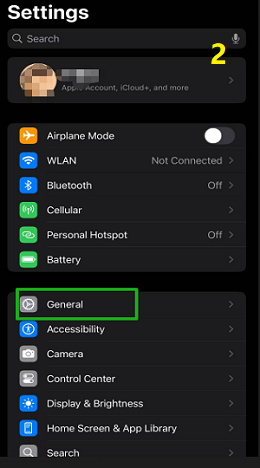
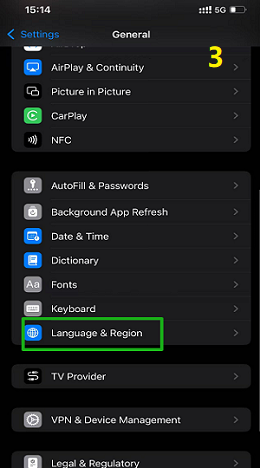
- First find the settings in the IOS system.
- Then find [General] in the menu.
- In the menu list, find**[Language&Region]**.
- You can modify the system language of IOS here.
- Then restart Duolingo to modify the App interface language.
How to delete language courses in Duolingo
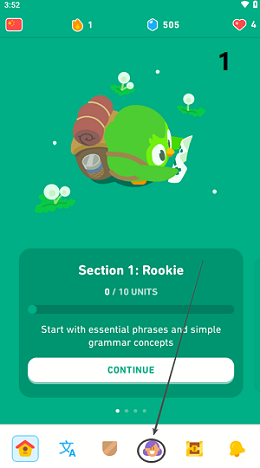
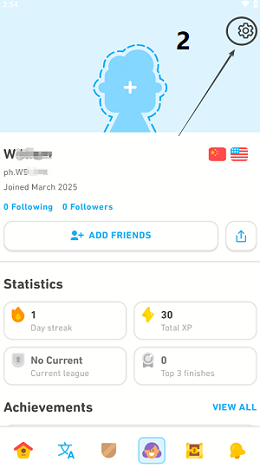
- First, we enter the main interface of Duolingo and select the personal profile.
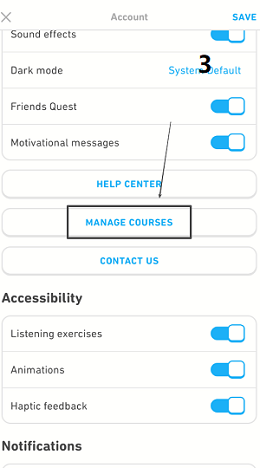
- Select the settings in the upper right corner and find [MANAGE COURSE] in the menu list.
- You can directly delete the language courses you don’t want to learn here.
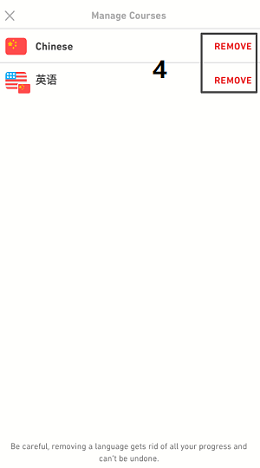 Note: After removing a course, you will not be able to restore the course and all your learning progress will be lost. Please proceed with caution.
Why should you use Duolingo?
1. Suitable for beginners
Duolingo can provide different learning routes based on the user's mastery of foreign languages, and a step-by-step learning model, so that beginners can better master the basics, while not putting too much learning pressure on beginners, causing them to give up language learning.
2. Most functions are free
As one of the most popular language learning tools in the world, you can learn multiple language courses without paying any fees. Of course, if you want to get more functions, you need to subscribe.
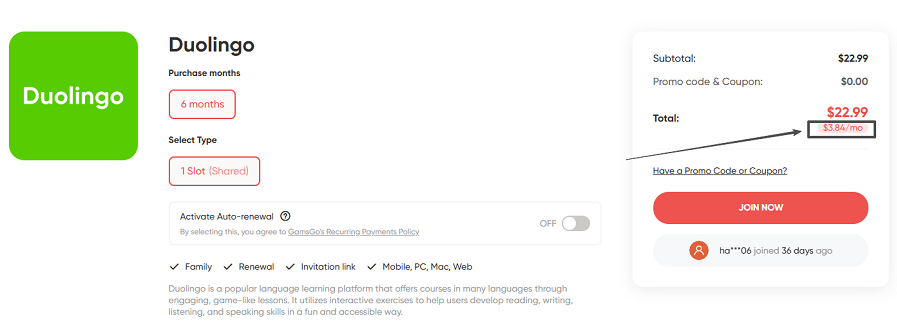
TypePriceDescription Basic Plan (Free)$0 Includes ads, limited practice sessions Duolingo Super$12.99/month & $83.99/year No ads, unlimited practice, offline downloads, single-user only Duolingo Family Plan$9.99/month Supports up to 6 accounts, ideal for sharing Duolingo Shared Account$3.84/monthGamsGo shared account (Unofficial)
Note:
- Duolingo Super account supports 14-day free trial.
- GamsGo shared account subscription Duolingo will be cheaper.
- Specific prices will vary according to different regions.
3. Guide learning through animation, games, etc.
It will prepare learning tasks for users on the day, improve learning enthusiasm through levels and points reward mode, and make language learning gradually become a habit of life.
4. Adjust course content and difficulty according to mastery level
Adjust practice strategy according to learning progress and mastery of language, support offline learning, you can download courses to local for learning, and also provide pronunciation and listening practice.
Languages supported by Duolingo (2025)
CategoryLanguageDescription **European Languages (Latin & Germanic Languages)**English Available for non-native English speakers Spanish (Español) French (Français) Italian (Italiano) Portuguese (Português) German (Deutsch) Dutch (Nederlands) Swedish (Svenska) Danish (Dansk) Norwegian (Norsk) Asian LanguagesMandarin Chinese (中文)Focuses on Pinyin, no handwriting practice Japanese (日本語)Supports Hiragana, Katakana, and some Kanji Korean (한국어)Hangul-based learning Hindi Indonesian(Bahasa Indonesia) Vietnamese(Tiếng Việt) Thai **Slavic Languages (Eastern Europe & Russia)**Russian Polish Czech Ukrainian Turkish Arabic Hebrew Swahili Endangered & Minority Languages European Endangered LanguagesIrish (Gaeilge)Ireland Welsh (Cymraeg)Wales, UK Scottish Gaelic (Gàidhlig)Scotland Indigenous American LanguagesNavajo (Diné Bizaad)Native American language (USA) Hawaiian (ʻŌlelo Hawaiʻi) **Artificial Languages (Constructed by Humans)**Esperanto An international auxiliary language created in the 19th century Klingon From Star Trek High Valyrian From Game of Thrones
Duolingo supports more than 30 different languages.
Provides learning content for European, Asian, rare European languages and artificial languages.
Supports multiple language learning paths and is highly interactive during the learning process.